Guide · OpenAPI · MCP
Connect ChatGPT to your database
Run Faucet next to your database, create a read-only API key, and expose Faucet over HTTPS. Then either add a Custom GPT Action that imports https://your-host/openapi.json with the key in an X-API-Key header, or, from your own code, pass Faucet's /mcp endpoint as an MCP tool to the OpenAI Responses API. ChatGPT connectors need OAuth, which Faucet doesn't offer yet.
Two routes that work today
| Route | Best for | What ChatGPT uses |
|---|---|---|
| Custom GPT Action | Using your data in the ChatGPT app | Faucet’s REST API, described by /openapi.json |
| Responses API MCP tool | Your own app or agent built on the OpenAI API | Faucet’s MCP endpoint, /mcp |
Both need a URL OpenAI’s servers can reach, so the setup starts the same way.
1. Connect your database to Faucet
npx @faucetdb/faucet serveOpen http://localhost:8080, create an admin account, and add your database with its host, port, database, username and password. Test connection checks it before you save. Setup guides: PostgreSQL, MySQL and MariaDB, SQL Server, Oracle, SQLite, Snowflake.
2. Create a read-only key
faucet role create --name chatgpt-readonly --verbs GET --service mydb
faucet key create --role chatgpt-readonly --label chatgpt   # prints the key once
Or create a Read only role and a key in the admin UI. Leave raw SQL off for any database ChatGPT can reach.
3. Expose Faucet over HTTPS
Expose Faucet, never the database port. Pick one:
- Reverse proxy: nginx or Caddy in front of Faucet with a TLS certificate.
- Cloudflare Tunnel:
cloudflared tunnel --url http://localhost:8080prints a temporaryhttps://URL for testing. - ngrok:
ngrok http 8080prints a publichttps://URL.
Check it from outside your network:
curl https://your-host/healthz
curl "https://your-host/api/v1/mydb/_table?limit=5" -H "X-API-Key: faucet_YOUR_KEY"
4a. Custom GPT Action
- Create a GPT and add an Action.
- Import the schema from
https://your-host/openapi.json. Faucet generates this OpenAPI 3.1 spec from your live schema. - Set authentication to API key, auth type Custom, header name
X-API-Key, and paste your key.
The GPT can then call endpoints such as GET /api/v1/mydb/_table/orders?filter=status = 'open'&limit=25. Filters work like a SQL WHERE clause and are always sent as bound parameters.
4b. OpenAI Responses API
If you build on the OpenAI API, pass Faucet as an MCP tool in the tools array:
{
  "type": "mcp",
  "server_label": "faucet",
  "server_url": "https://your-host/mcp",
  "headers": { "X-API-Key": "faucet_YOUR_KEY" },
  "require_approval": "never"
}
The model can then call Faucet’s tools, such as faucet_list_tables, faucet_describe_table and faucet_query, limited by the key’s role. Drop require_approval if you want to approve calls yourself.
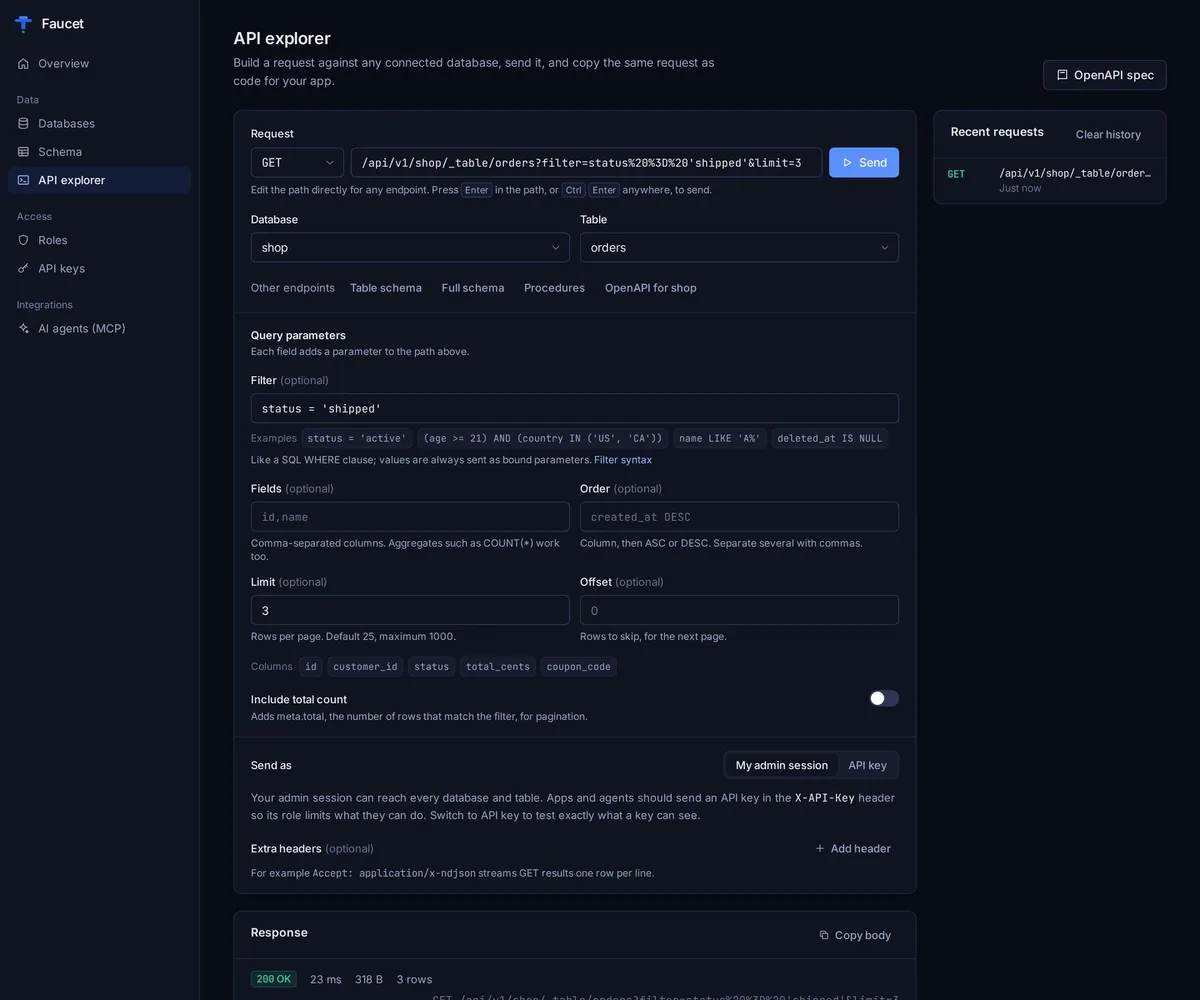
Before handing a key to ChatGPT, the admin UI’s API explorer can send requests as that key, so you see exactly what it can read.
Why not a ChatGPT connector?
ChatGPT connectors authenticate with OAuth. Faucet’s REST API and MCP endpoint use API keys and Faucet doesn’t offer OAuth yet, so a connector can’t sign in. The two routes above send the key as a header instead.
Frequently asked questions
Can I add Faucet as a ChatGPT connector?
Not today. ChatGPT connectors sign in with OAuth, and Faucet authenticates with API keys and does not offer OAuth yet. A Custom GPT Action (using Faucet's OpenAPI spec) or the OpenAI Responses API's MCP tool works instead.
Does my database have to be on the internet?
No. Only Faucet has to be reachable over HTTPS, because OpenAI calls it from its own servers. Run Faucet next to the database and expose Faucet with a reverse proxy, Cloudflare Tunnel or ngrok. The database port stays private.
Which key should ChatGPT get?
Its own key, bound to a role that only grants GET on the tables it needs. Faucet denies anything a role doesn't grant, and you can revoke the key at any time without affecting other apps.
Can ChatGPT see every row in a table it can read?
Yes. Faucet's roles work per database, table and verb. Row-level filters are stored but not enforced yet, and there are no column-level permissions, so to share part of a table, expose a database view instead.
Does this work for my Postgres database? What about SQL Server or Oracle?
Yes. The same steps work for PostgreSQL, MySQL, MariaDB, SQL Server, Oracle, SQLite and Snowflake, because ChatGPT only ever talks to Faucet's REST API or MCP endpoint.
Try it on your own database
Free, MIT-licensed, no account needed.
npx @faucetdb/faucet serve
or brew install faucetdb/tap/faucet · docker run -p 8080:8080 -v faucet-data:/data faucetdb/faucet
Faucet is independent and not affiliated with or endorsed by the companies whose products are named on this page. Spot something out of date? Open an issue.