Guide · MCP
Connect Claude to your database
Run Faucet next to your database, create an API key with a read-only role, and add Faucet's MCP endpoint (http://localhost:8080/mcp) to Claude with that key in an X-API-Key header. Claude can then list your tables, read their schemas and query rows, and the key's role limits everything it does.
What you need
- A SQL database: PostgreSQL, MySQL, MariaDB, SQL Server, Oracle, SQLite or Snowflake.
- Claude Code or Claude Desktop. Claude Desktop also needs Node.js for the
mcp-remotebridge. - Faucet, which runs with
npx, Homebrew, Docker, Go or a downloaded binary.
1. Start Faucet and connect your database
npx @faucetdb/faucet serveOpen http://localhost:8080, create an admin account, then add your database: enter the host, port, database, username and password, click Test connection, and save. Prefer the terminal? Add the database before starting the server:
faucet db add --name mydb --driver postgres \
  --host localhost --user app --password-prompt --database mydb
faucet serve
Per-database details are in the setup guides for PostgreSQL, MySQL and MariaDB, SQL Server, Oracle, SQLite and Snowflake.
2. Create a read-only key for Claude
faucet role create --name claude-readonly --verbs GET --service mydb
faucet key create --role claude-readonly --label claude   # prints the key once
In the admin UI, create a role with Read only access, then create a key for it on the API keys page. Roles are fail-closed: anything the role doesn’t grant is denied. Give Claude write access later, table by table, only if it needs it.
3a. Claude Code
claude mcp add --transport http faucet http://localhost:8080/mcp \
  --header "X-API-Key: faucet_YOUR_KEY"
Add --scope user to use Faucet in every project, or --scope project to share it with your team through .mcp.json.
3b. Claude Desktop
Claude Desktop only launches local commands, so the mcp-remote bridge forwards its requests to Faucet with your key. Open Settings → Developer → Edit config, or edit ~/Library/Application Support/Claude/claude_desktop_config.json (macOS) or %APPDATA%\Claude\claude_desktop_config.json (Windows):
{
  "mcpServers": {
    "faucet": {
      "command": "npx",
      "args": ["-y", "mcp-remote", "http://localhost:8080/mcp", "--header", "X-API-Key:faucet_YOUR_KEY"]
    }
  }
}
Restart Claude Desktop. For a Faucet server on another machine over plain http://, add "--allow-http" to the args.
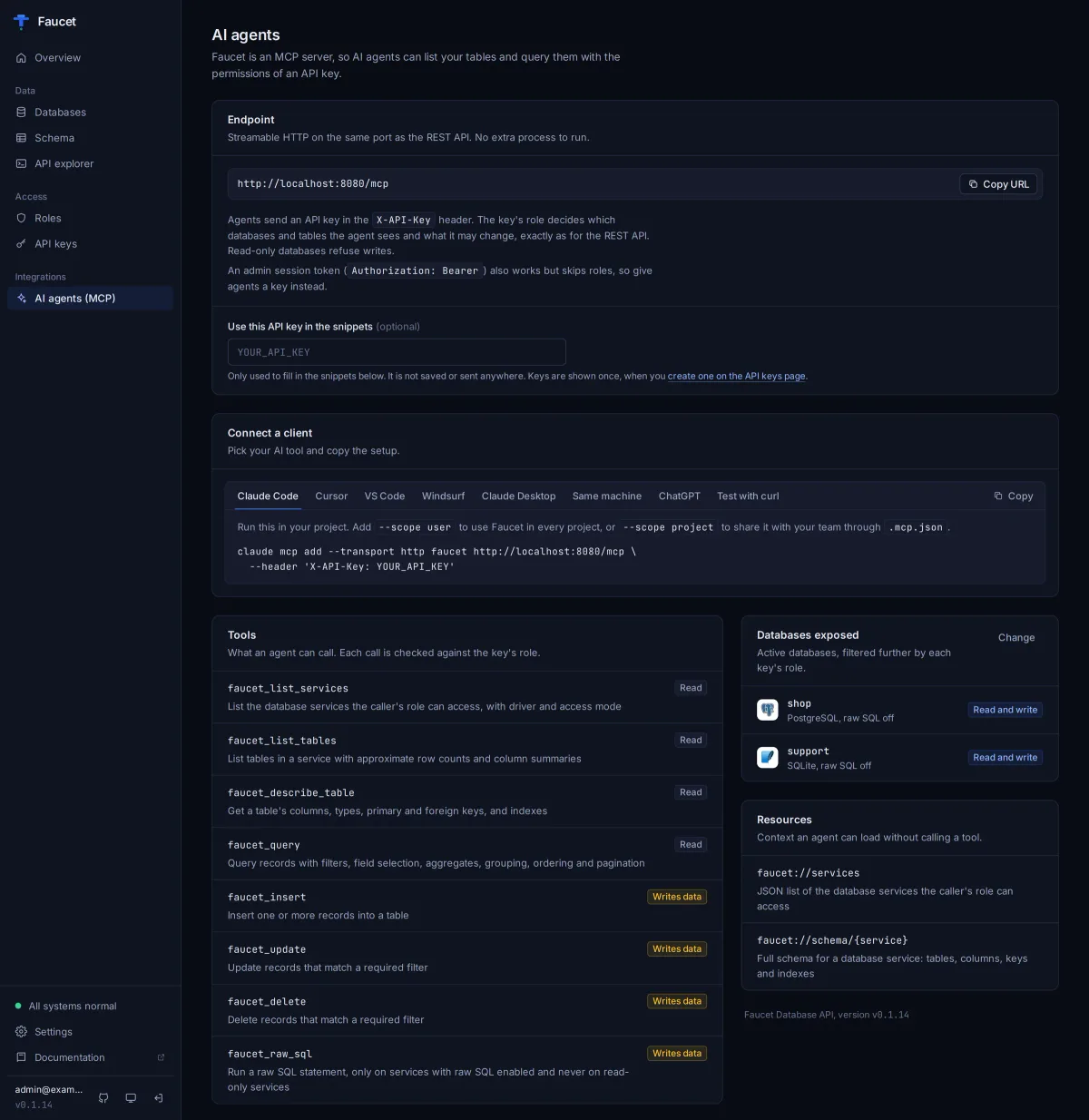
The admin UI’s AI agents page generates both configs (and ones for Cursor, VS Code and Windsurf) with your key filled in.
4. Ask Claude about your data
Claude sees eight tools. With a read-only key it uses the first four:
| Tool | What it does |
|---|---|
faucet_list_services | Lists the databases the key can reach |
faucet_list_tables | Lists tables with row counts and column summaries |
faucet_describe_table | Columns, types, primary and foreign keys |
faucet_query | Filtered, sorted, paginated reads |
faucet_insert, faucet_update, faucet_delete | Writes, only if the role grants them; updates and deletes require a filter |
faucet_raw_sql | Raw SQL, off unless the database allows it and the role grants all five verbs on _sql |
Try prompts such as “Which tables are in mydb?” or “Show the ten most recent orders that are still pending.” Tools carry read-only and destructive hints, so Claude can ask before any write.
Database on-prem or on another server?
Run Faucet on a machine that can reach the database, and point Claude at that machine’s /mcp URL. If Claude runs outside your network, expose only Faucet over HTTPS (a reverse proxy, Cloudflare Tunnel or ngrok), never the database port. Every /mcp request still needs a valid key, and you can revoke a key at any time with faucet key revoke.
Why not claude.ai connectors?
Custom connectors in claude.ai on the web need either no authentication or OAuth. Faucet’s MCP endpoint uses API keys and doesn’t offer OAuth yet, so use Claude Code or Claude Desktop, which both send your key as a header.
Frequently asked questions
Can Claude read my database without being able to change it?
Yes. Give Claude an API key whose role only grants GET. Faucet checks every MCP tool call against that role, so faucet_insert, faucet_update and faucet_delete are refused. You can also mark the database read-only in Faucet, which blocks writes whatever a role allows.
Does this work with a database on my laptop or on-prem?
Yes. Claude Code and Claude Desktop run on your machine, so they can reach a Faucet server on localhost or your internal network. Nothing needs to be exposed to the internet for these two clients.
Can I add Faucet as a connector in claude.ai on the web?
Not yet. claude.ai connectors require no authentication or OAuth, and Faucet uses API keys and does not offer OAuth. Use Claude Code or Claude Desktop instead.
Why does Claude Desktop need mcp-remote?
Claude Desktop's config file only launches local commands. mcp-remote (run with npx, so it needs Node.js) is a small local command that forwards Claude's MCP requests to Faucet's /mcp URL with your X-API-Key header, so the key's role still applies.
Should I use `faucet mcp` (stdio) instead?
Only on your own machine. faucet mcp lets the client start Faucet over stdio, but it runs with full admin rights and ignores roles. The /mcp endpoint with an API key is the safer default.
Which databases can Claude use through Faucet?
PostgreSQL, MySQL, MariaDB, SQL Server, Oracle, SQLite and Snowflake. One Faucet server can expose several databases at once; each is a separate service the key's role can include or exclude.
Try it on your own database
Free, MIT-licensed, no account needed.
npx @faucetdb/faucet serve
or brew install faucetdb/tap/faucet · docker run -p 8080:8080 -v faucet-data:/data faucetdb/faucet
Faucet is independent and not affiliated with or endorsed by the companies whose products are named on this page. Spot something out of date? Open an issue.