SQL Server
SQL Server REST API and MCP server
Faucet puts a REST API and an MCP server in front of an existing SQL Server 2012–2022 or Azure SQL database. Run it next to the database, connect with host, port, database, username and password, and every table is served at /api/v1/<name>/_table/<table> with filters and pagination, documented by OpenAPI 3.1, with API keys and roles deciding who can read or change what.
Built for the SQL Server you already have
A lot of useful data lives in SQL Server instances behind a firewall, often in schemas nobody wants to touch. Faucet doesn’t need you to touch them. It is a single binary for Linux, macOS or Windows that connects as a normal SQL login, reads the schema, and serves it. Your apps, scripts and AI agents talk to Faucet; only Faucet talks to the database.
- Versions: SQL Server 2012, 2014, 2016, 2017, 2019 and 2022; Azure SQL Database; Amazon RDS for SQL Server. Not 2008 or 2008 R2.
- Driver: go-mssqldb (TDS), built in. No ODBC driver to install.
- Schema:
dboby default; choose another with--schemaor in the database’s access options.
1. Connect SQL Server
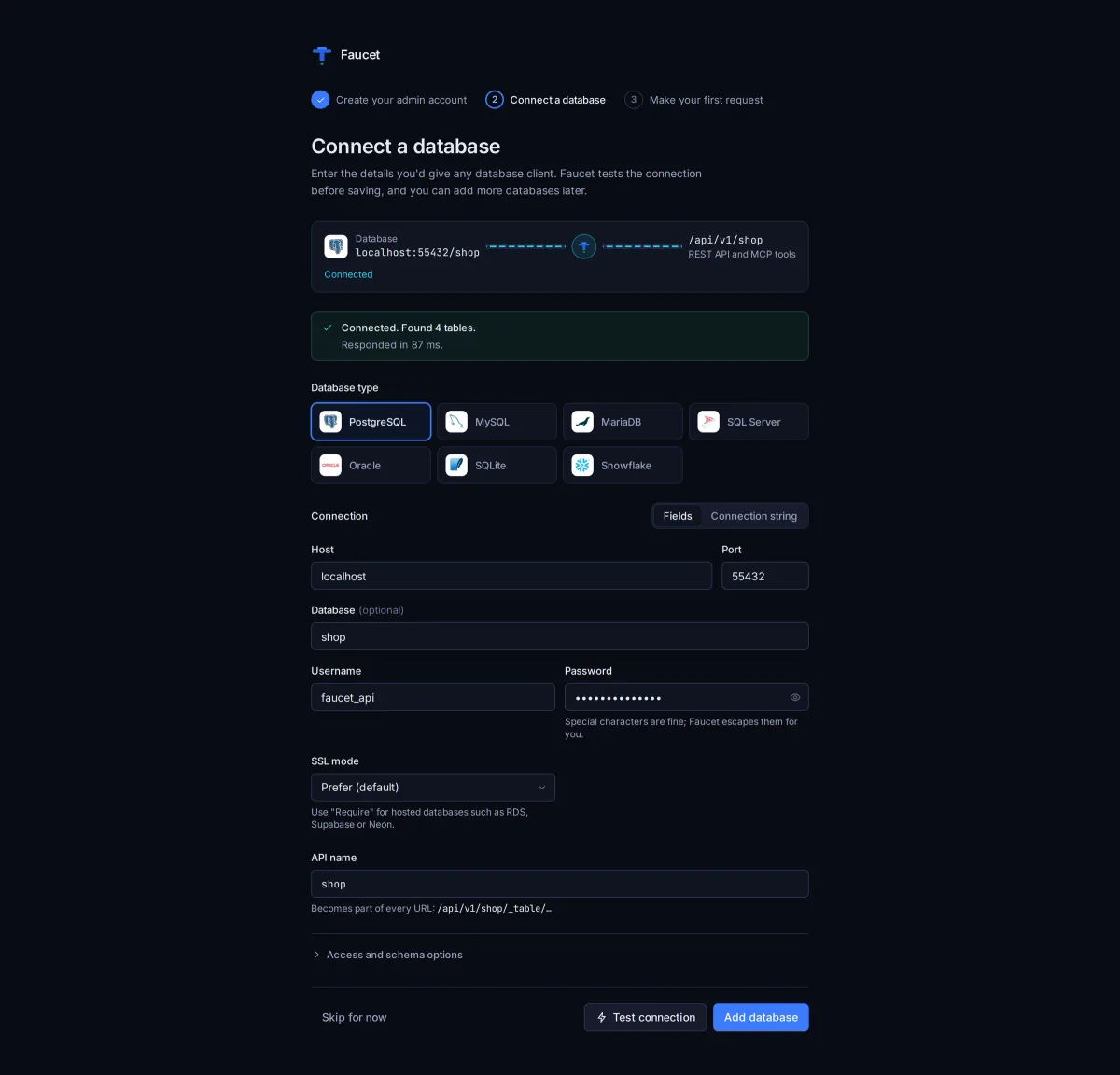
npx @faucetdb/faucet serve # or the Windows binary from GitHub ReleasesOpen http://localhost:8080, go to Databases → Add database, pick SQL Server and fill in:
- Host and Port (1433 by default)
- Database, Username and Password
- Encryption: On for Azure SQL. Turn on Trust server certificate for a local or internal server with a self-signed certificate.
Click Test connection before saving. If it fails, Faucet shows SQL Server’s error with a plain-language hint (connection refused, unknown host, login failed, TLS mismatch). Save anyway stores a server you can’t reach yet.
From the command line (add the database before faucet serve, or restart afterwards):
faucet db add --name erp --driver mssql \
  --host sql01.internal --user api_reader --password-prompt --database erp

# or with a connection string
faucet db add --name erp --driver mssql \
  --dsn "sqlserver://api_reader:[email protected]:1433?database=erp"
Use a dedicated SQL login with only the permissions the API needs. Read-only access in SQL Server plus a read-only role in Faucet is a sensible start.
2. Create a role and an API key
faucet role create --name erp-reader --verbs GET --service erp
faucet key create --role erp-reader --label reporting   # prints the key once
You can also flag the whole database read-only in Faucet, which blocks inserts, updates and deletes through both REST and MCP whatever a role allows.
3. Query it over REST
curl "http://localhost:8080/api/v1/erp/_table/Customers?filter=Country%20%3D%20'DE'&order=Name&limit=25" \
  -H "X-API-Key: faucet_YOUR_KEY"

# Call a stored procedure (with a role that allows it)
curl -X POST "http://localhost:8080/api/v1/erp/_proc/GetOpenOrders" \
  -H "X-API-Key: faucet_YOUR_KEY" -H "Content-Type: application/json" \
  -d '{"params": {"CustomerId": 42}}'
Inserts and updates return the affected rows (Faucet uses SQL Server’s OUTPUT clause), and updates and deletes require a filter. The OpenAPI 3.1 spec at /openapi.json describes every table, so a modern frontend, a low-code tool or a generated client can use a legacy database without a hand-written backend.
4. Let AI agents query it, safely
The same server is an MCP server at /mcp. Give an agent a key bound to a read-only role and it can list tables, read their schema and query rows, and nothing else:
claude mcp add --transport http faucet http://localhost:8080/mcp \
  --header "X-API-Key: faucet_YOUR_KEY"
Raw SQL stays off unless you allow it on the database and grant it to the role. Setup for Claude Desktop, Cursor, VS Code, Windsurf and ChatGPT is in the MCP docs.
Reaching an on-prem SQL Server from the cloud
Keep SQL Server where it is. Run Faucet on a host inside the network, then expose only Faucet over HTTPS with a reverse proxy (nginx or Caddy) or a tunnel such as Cloudflare Tunnel or ngrok. Every request needs an API key, each app or agent gets its own, and faucet key revoke cuts one off without affecting the rest.
Frequently asked questions
How do I create a REST API for SQL Server?
Run Faucet on a machine that can reach the SQL Server, add the database with its host, port, database, username and password, create an API key, and start faucet serve. Every table in the exposed schema (dbo by default) is served at /api/v1/<name>/_table/<table> with filters, sorting and pagination, plus an OpenAPI 3.1 spec at /openapi.json.
Which SQL Server versions are supported?
SQL Server 2012 through 2022, Azure SQL Database and Amazon RDS for SQL Server. SQL Server 2008 and 2008 R2 are not supported, because Faucet paginates with OFFSET/FETCH, which needs 2012 or later.
Does Faucet need anything installed on the SQL Server?
No. Faucet is a single binary that connects as an ordinary SQL login over the network (TDS on port 1433 by default). Nothing is installed on the database server and the schema is not changed.
Can I keep the SQL Server off the internet?
Yes. Run Faucet inside your network next to the database. Apps on the same network call Faucet directly; for cloud tools, expose only Faucet over HTTPS with a reverse proxy or a tunnel. The SQL Server port stays private.
Can I call stored procedures?
Yes. Faucet lists them at /api/v1/<name>/_proc and runs one with POST /api/v1/<name>/_proc/<procedure> and a JSON body of parameters.
What does "Trust server certificate" do?
It accepts the server's TLS certificate without verifying it, which is useful for a local or internal SQL Server with a self-signed certificate. For Azure SQL, set Encryption to On and leave it off.
Try it on your own database
Free, MIT-licensed, no account needed.
npx @faucetdb/faucet serve
or brew install faucetdb/tap/faucet · docker run -p 8080:8080 -v faucet-data:/data faucetdb/faucet
Faucet is independent and not affiliated with or endorsed by the companies whose products are named on this page. Spot something out of date? Open an issue.