PostgreSQL
PostgreSQL REST API and MCP server
Faucet turns an existing PostgreSQL database into a REST API and an MCP server without code or schema changes. Connect it with host, port, database, username and password, create an API key, and every table is served at /api/v1/<name>/_table/<table> with filters, sorting and pagination, documented by an OpenAPI 3.1 spec, while AI agents use the same tables through /mcp.
Supported PostgreSQL versions and hosts
- Versions: PostgreSQL 9.6, 10, 11, 12, 13, 14, 15, 16 and 17.
- Hosting: self-hosted or on-prem, Amazon RDS, Aurora, Supabase, Neon and Azure Database for PostgreSQL.
- Driver: pgx v5, pure Go, built into the single Faucet binary. Nothing else to install.
1. Connect PostgreSQL
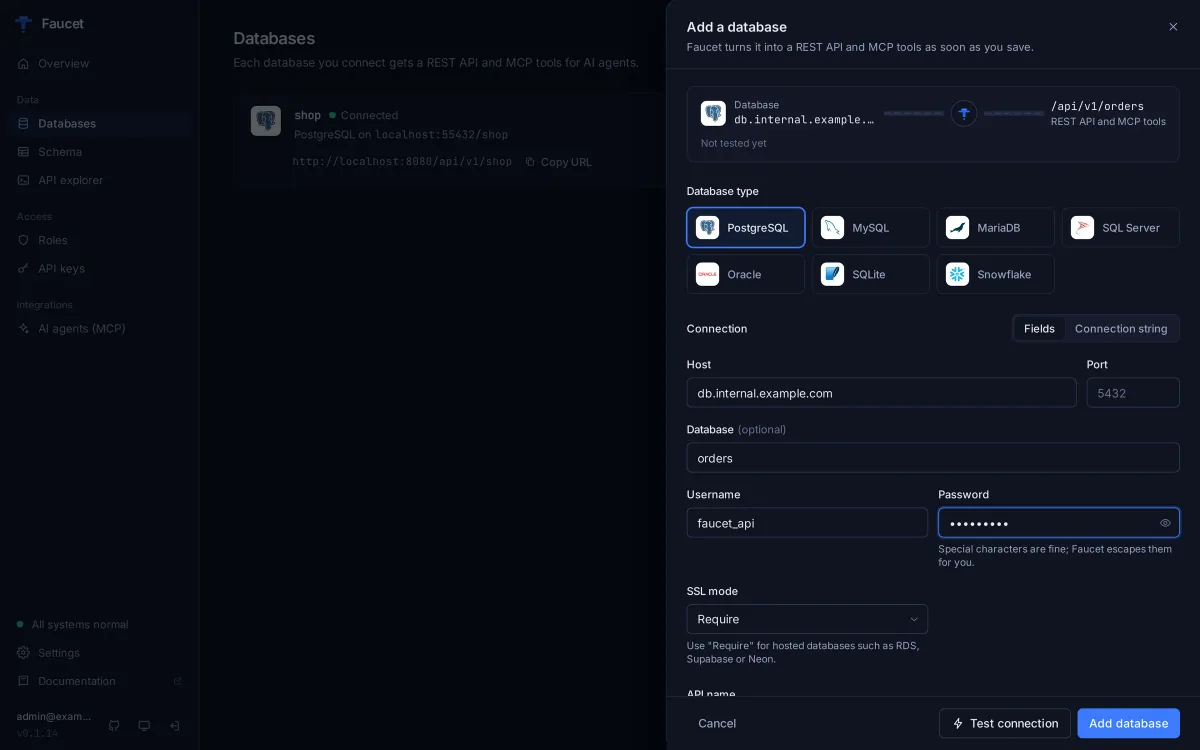
npx @faucetdb/faucet serveOpen http://localhost:8080, go to Databases → Add database, pick PostgreSQL and fill in:
- Host and Port (5432 by default)
- Database, Username and Password. Special characters in the password need no escaping.
- SSL mode: leave Prefer for a local database; choose Require for RDS, Supabase, Neon and other hosted services.
Click Test connection. Faucet reports how many tables it found, or explains what went wrong, before anything is saved. Then click Add database; the API is live immediately.
From the command line, add the database before starting the server (a running server picks up CLI-added databases on its next start):
faucet db add --name mydb --driver postgres \
  --host db.example.com --user api --password-prompt --database mydb --ssl-mode require

# or paste the connection string from your provider
faucet db add --name mydb --driver postgres \
  --dsn "postgres://user:[email protected]:5432/mydb?sslmode=require"
Make sure the database accepts connections from the machine running Faucet (security groups or IP allow-lists on hosted services). To expose a schema other than public, set it with --schema or in the database’s access options.
2. Create a role and an API key
faucet role create --name reader --verbs GET --service mydb
faucet key create --role reader   # prints the key once
Roles grant GET, POST, PUT, PATCH and DELETE per database and per table. Anything a role doesn’t grant is denied.
3. Query PostgreSQL over REST
# List tables
curl "http://localhost:8080/api/v1/mydb/_table" -H "X-API-Key: faucet_YOUR_KEY"

# Read rows with a filter, chosen fields, sorting and pagination
curl "http://localhost:8080/api/v1/mydb/_table/orders?filter=status%20%3D%20'shipped'&fields=id,total&order=created_at%20DESC&limit=10&offset=0" \
  -H "X-API-Key: faucet_YOUR_KEY"

# Include the total count for pagination
curl "http://localhost:8080/api/v1/mydb/_table/orders?include_count=true&limit=10" \
  -H "X-API-Key: faucet_YOUR_KEY"
Filters read like a SQL WHERE clause, for example age > 21 AND status IN ('active', 'trial') or email IS NOT NULL, and every value is sent as a bound parameter. Responses wrap rows in a resource array.
With a role that allows writes, inserts return the new rows, including server-generated IDs and defaults, because Faucet uses PostgreSQL’s RETURNING. Updates and deletes require a filter or ids:
curl -X POST "http://localhost:8080/api/v1/mydb/_table/customers" \
  -H "X-API-Key: faucet_YOUR_KEY" -H "Content-Type: application/json" \
  -d '{"resource": [{"name": "Acme Corp", "email": "[email protected]"}]}'

curl -X PATCH "http://localhost:8080/api/v1/mydb/_table/customers?ids=42" \
  -H "X-API-Key: faucet_YOUR_KEY" -H "Content-Type: application/json" \
  -d '{"name": "Acme Corporation"}'
The full OpenAPI 3.1 spec is at /openapi.json; import it into Postman or a client generator.
4. Give AI agents the same database over MCP
The MCP endpoint runs on the same port. Connect an agent with a read-only key:
claude mcp add --transport http faucet http://localhost:8080/mcp \
  --header "X-API-Key: faucet_YOUR_KEY"
The agent can list tables, describe them and query rows, limited by the key’s role. Configs for Claude Desktop, Cursor, VS Code, Windsurf and ChatGPT are in the MCP docs and on the admin UI’s AI agents page.
What you get for PostgreSQL
| Feature | Faucet with PostgreSQL |
|---|---|
| CRUD on tables and views | /_table/{table} with GET, POST, PUT, PATCH, DELETE |
| Inserted rows returned | Yes, via RETURNING |
| Functions and stored procedures | /_proc/{name} |
| Schema changes | Create, alter and drop tables via /_schema |
| Batch writes | All-or-nothing with ?rollback=true, or per record with ?continue=true |
| Streaming | NDJSON with Accept: application/x-ndjson |
| Auth | API keys bound to roles (per database, table and verb) |
| Not supported | GraphQL, enforced row-level filters, column-level permissions, OAuth/SSO |
Frequently asked questions
How do I turn a PostgreSQL database into a REST API?
Connect the database to Faucet (in the admin UI or with faucet db add), create an API key bound to a role, and start faucet serve. Every table is then available at /api/v1/<name>/_table/<table> with filters, sorting and pagination, described by an OpenAPI 3.1 spec at /openapi.json.
Which PostgreSQL versions and hosts are supported?
PostgreSQL 9.6 through 17, self-hosted or on Amazon RDS, Aurora, Supabase, Neon or Azure Database for PostgreSQL. Hosted services usually need SSL mode set to Require.
Do I have to change my schema or install an extension?
No. Faucet reads your schema and serves it as it is. It needs a database user that can read (and, if you allow writes, change) the tables you want to expose.
Can AI agents use the same Postgres database?
Yes. The same server exposes an MCP endpoint at /mcp. Agents such as Claude Code, Cursor or VS Code connect with an API key, and that key's role decides which tables they can read or change.
How is this different from PostgREST?
PostgREST is a mature, PostgreSQL-only server that relies on Postgres roles and row-level security. Faucet adds API keys and roles that live outside the database, an admin UI, an MCP server, and six other databases. Faucet does not enforce row-level security policies through its own roles.
Can I call PostgreSQL functions and stored procedures?
Yes. Faucet lists them at /api/v1/<name>/_proc and calls one with POST /api/v1/<name>/_proc/<proc> and a JSON body of parameters.
Try it on your own database
Free, MIT-licensed, no account needed.
npx @faucetdb/faucet serve
or brew install faucetdb/tap/faucet · docker run -p 8080:8080 -v faucet-data:/data faucetdb/faucet
Faucet is independent and not affiliated with or endorsed by the companies whose products are named on this page. Spot something out of date? Open an issue.